 Krazy Stitcher
Choose Your Edition
From hobbyist to power user, there is a Krazy Stitcher for every beader.
Krazy Stitcher
- 22 stitch types (peyote, brick, loom, RAW, spiral rope, netting, and more)
- Turn any photo into a bead pattern with smart color matching
- PDF, PNG, and word chart export
- Full shape toolkit: draw, fill, line, rectangle, oval, triangle, diamond
- Pattern search and project library
- Password-protect patterns before you share them
- 100% offline and private
Krazy Stitcher Pro
- Everything in Base, plus:
- 25 stitch types (3 additional — Ladder Stitch, Albion Stitch, Bead Crochet Rope)
- Rotatable 3D preview and live symmetric drawing
- Palette brand remapping (Miyuki, Toho, Preciosa)
- Real SVG and CSV export
- Color Reduction (Merge Closest Colors / Bayer dithering) and 300 DPI hi-res export
- Enhanced Backup: automatic Version History + Chromium folder auto-export
- Gradient fill and text overlay
- Bead inventory tracking and cost estimator
- Difficulty scoring
- Recolor and merge similar colors
- Fringe editor and bead shaping
- Tubular stitch support
- Print layout with pagination
- Pattern notes and annotations
- Tiling and repeat mode
- Guide overlay
- Row-by-row work tracker
Krazy Stitcher Studio
- Everything in Pro, plus:
- Color harmony engine
- Templates library
- Pattern scale tool
- Import external formats (BeadTool, CSV)
- Stitch-along autoplay
- Advanced layer system
- Multi-pattern workspace
- Batch Export: multi-pattern PDF/PNG to one .zip
- Batch Photo Import: convert multiple photos into patterns in one pass
- Bulk/wholesale distribution & pattern-book publishing rights
Each license covers personal use on up to 3 devices you own. Need more? Additional licenses are inexpensive — and schools, guilds, and other institutions can inquire about quantity pricing. Bringing Krazy Stitcher into a classroom or library computer lab? See our lab & classroom FAQ.
See It in Action
No guessing — here's exactly what you get.
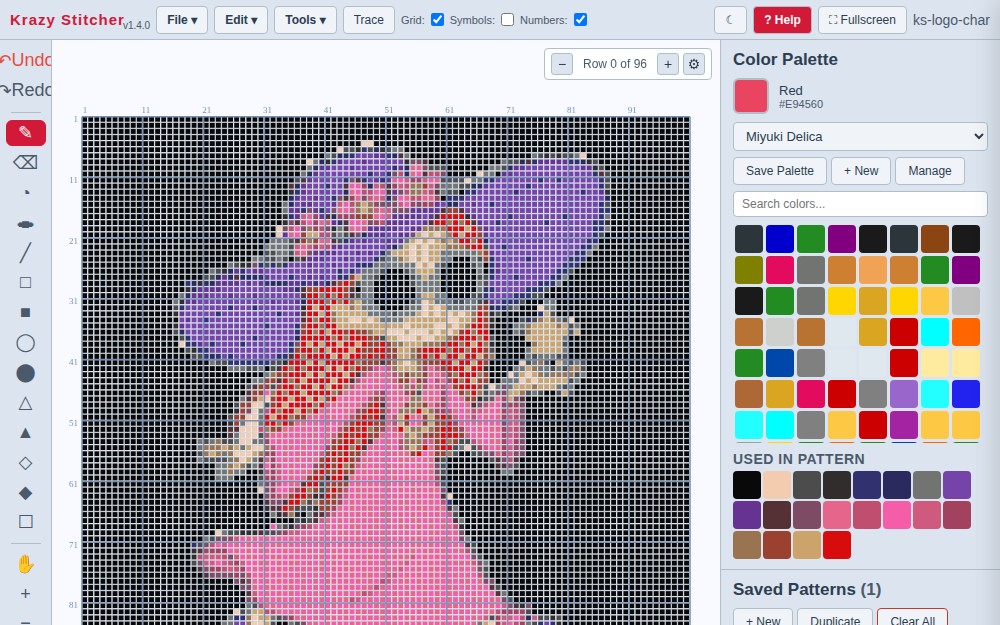
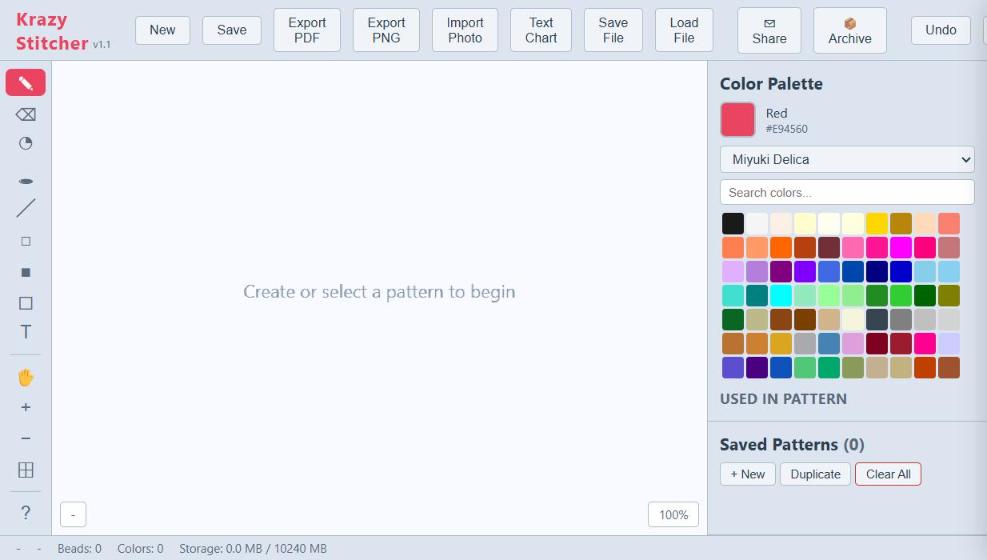
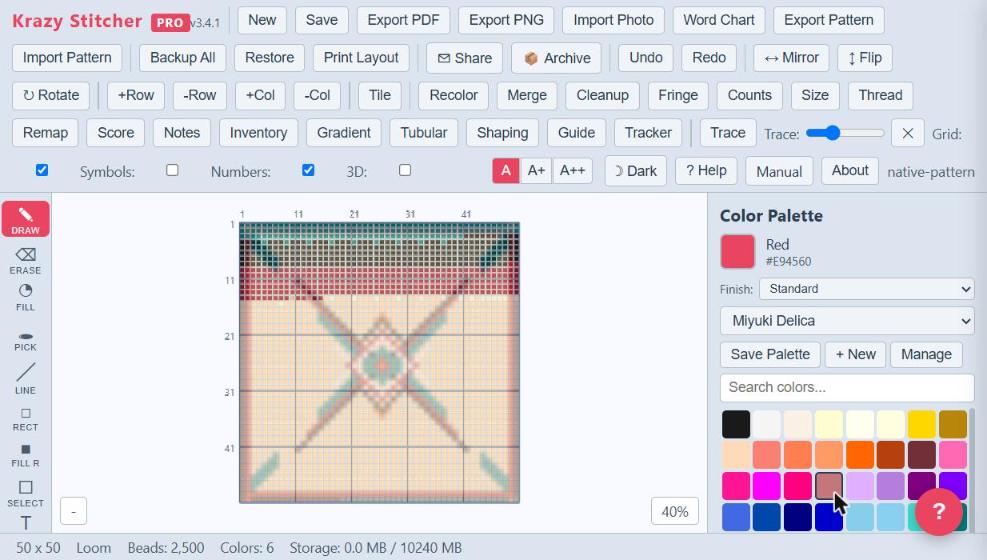
Design in a clean, visual editor
Pick your stitch, choose your colors, and start placing beads. Every tool is one click away — no menus to memorize.
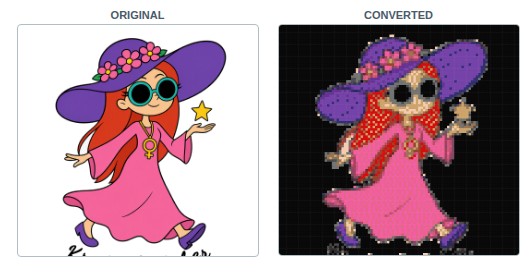
Turn any photo into a pattern
Import a picture and watch it become a stitchable design — with the exact bead colors you need to buy.
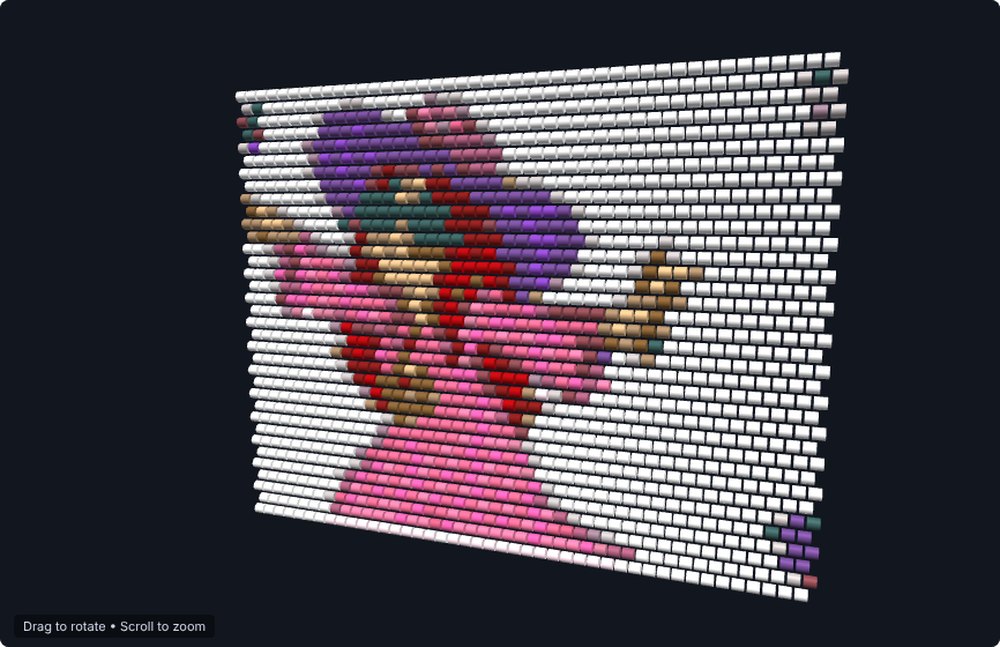
See it before you stitch it
In Pro and Studio, the 3D preview shows your pattern with realistic bead shapes — rounded cylinders with highlights and shadows. Know exactly what it'll look like in your hands.
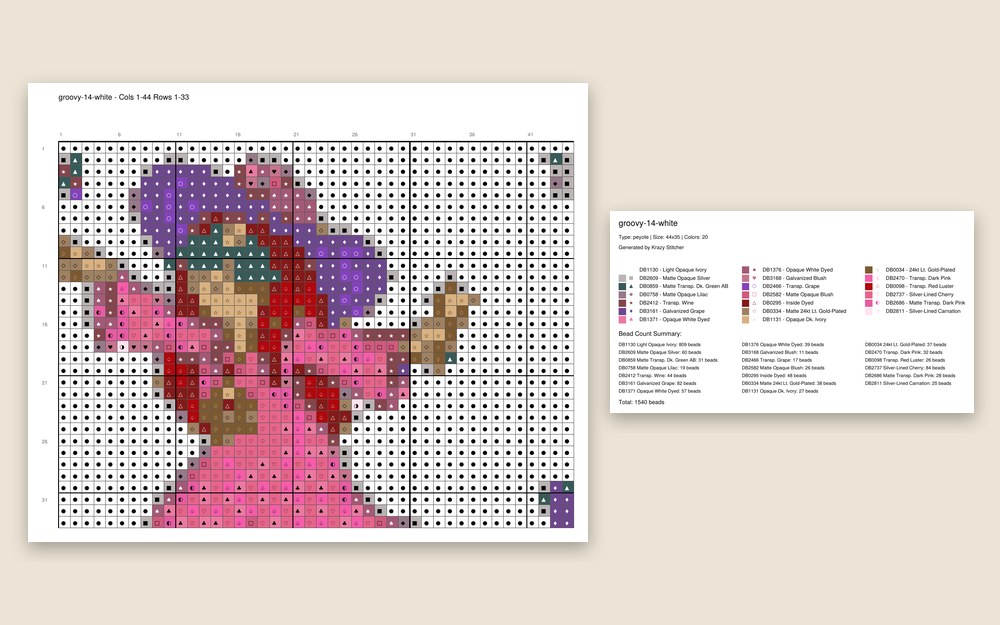
Export and start stitching
Print a clean PDF pattern with color legend and bead counts, a row-by-row word chart, or a high-res image. Take it to your beading table or share with a friend.
Everything You Need. Nothing You Don't.
55+ features in a single file that works on your computer — no internet needed, no installs, no updates, no accounts. Just your patterns, on your machine, completely private.
Every Stitch You Use — and the Ones You've Been Wanting to Try
If you've ever wanted to design a netting collar, a spiral rope necklace, or a Dutch spiral bracelet and your current software couldn't do it — Krazy Stitcher can.
Base covers the essentials and then some: even-count peyote (2-drop through 9-drop), brick stitch, loom, right-angle weave, herringbone, square stitch, gourd stitch, spiral rope, Dutch spiral, netting, and more — 22 stitch types total.
Pro & Studio add 3 more: Ladder Stitch, Albion Stitch, and Bead Crochet Rope.
That's 25 stitch types — more than most bead software on the market. Each one has its own accurate grid, so your bead counts and finished dimensions are right before you pick up a needle. (CRAW, Chenille Stitch, Triangle Weave, and St. Petersburg Chain are on the roadmap but not available in any edition yet.)
Turn Any Photo into a Bead Pattern
Drop in any photo — your cat, a landscape, a family portrait. Adjust brightness and colors, then choose how you want the beads matched: Dithering scatters bead colors to create natural-looking transitions (great for photos), while turning it off and using K-Means color grouping gives bold, graphic results. Try both and pick what looks right.
Palette Brand Remapping
Remap your entire pattern to Miyuki Delica, Toho, or Preciosa with one click. See exactly which beads to buy before you start.
Export Everywhere
PDF patterns, PNG images, word charts, and .ks project files. Print, share, or pick up where you left off.
Smart Tools That Save You Time
See how hard a pattern is before you start. Check your bead count and finished size. Clean up stray single beads that don't belong (beaders call this "confetti"). Merge similar colors, mirror your design, flip, rotate — all the tools you wish graph paper had.
Your Patterns Stay on Your Computer
Krazy Stitcher is a single file you save to your machine. No cloud storage of your patterns, no account required — your designs never leave your device. If the app hits an unexpected error, it sends us an anonymous technical report so we can fix bugs (see our Privacy Policy) — nothing else is ever tracked. It works with or without internet — once you have the file, you never need to be online.
3D Realistic Preview
See your pattern as it will actually look with realistic bead shapes — rounded cylinders with highlights and shadows. Toggle between grid and preview instantly. (Pro & Studio only)
Bead Inventory & Cost Estimator
Track your bead stock, see what you need to buy, and estimate project cost before you start. Inventory auto-deducts when you begin a pattern.
Row Work Tracker
Track your stitching progress row by row. Mark completed rows, see your percentage done, and pick up exactly where you left off.
Pattern Search & Filter
Find any saved pattern instantly by name. Search and filter your project library as it grows — no more scrolling through dozens of patterns.
Gradient Fill & Text Overlay
Generate smooth color gradients across your pattern and stamp text in pixel fonts. Add names, dates, or messages to any design.
Split & Recompose
Working on something oversized? Split a large pattern into a grid of tiles you can stitch one at a time, then recombine them into the finished whole. (Pro & Studio only)
Automatic Folder Backup
Point Krazy Stitcher at a folder on your computer — including a Dropbox, OneDrive, or iCloud folder — and every save automatically exports a snapshot there too, on top of manual backups and rolling version history. (Pro & Studio only, Chrome/Edge)
Print Layout & Backup
Generate paginated print layouts for large patterns. Backup and restore your entire project library with a single click.
How We Stack Up
Compare Krazy Stitcher with other bead pattern tools we reviewed.
| Feature | Krazy Stitcher | BeadTool 4† | Beadographer | Stitchmate |
|---|---|---|---|---|
| Price | $19.95 intro | $49.95† | Free tier; $14.99/yr membership | Free to design; $5.99/PDF, or $99/$149 pass |
| Works on your computer | ✓ | ✓† | ✓ | ✓ |
| Works offline | ✓ | Not stated | Not stated | Desktop app only |
| Stitch types | Up to 25 | Not stated | 17 | 5 crafts incl. fuse beads |
| Photo import | ✓ | ✓† | ✓ | ✓ |
| Smart color blending for photos | ✓ | Not stated | Not stated | Not stated |
| Match to real bead brand colors | ✓ | Not stated | Not stated | Not stated |
| Difficulty scoring | ✓ | Not stated | Not stated | Not stated |
| 3D realistic preview | ✓ | Not stated | Not stated | Not stated |
| Bead inventory tracking | ✓ | Not stated | Not stated | Not stated |
| Cost estimator | ✓ | Not stated | Not stated | Not stated |
| Row work tracker | ✓ | Not stated | Not stated | Not stated |
| PDF + PNG export | ✓ | PDF + PNG |
Competitor information is taken from each product’s own public pages, checked October 8, 2026. “Not stated” means that product’s own page did not mention the feature; it does not mean the feature is missing, so check their site. † BeadTool: beadtool.net could not be read, so the price, platforms, photo import and PDF come from the SourceForge listing (sourceforge.net/software/product/BeadTool/); confirm on their site. Beadographer: beadographer.com (free version; membership adds saving, custom palettes, inventory and extra PDF content). Stitchmate: stitchmate.app/pricing (PDF unlocks $5.99 each, or $99 Personal Pass / $149 Plus Pass; desktop app works offline). Prices and features change.
Add-Ons & Tools
Expand your Krazy Stitcher workflow with standalone tools that work alongside any edition.
Photo Converter
$59.95 one-time
Turn any photo into a bead-ready pattern. Smart color matching with a choice of dithering and color-grouping methods, for natural photos or bold graphics. Preview results side by side before committing.
Learn more about Photo Converter →Color Palette Tool
Free
Browse, compare, and build custom bead palettes from Miyuki, Toho, Preciosa, and more. Plan your colors before you start a pattern.
Learn more about the Color Palette Tool →Krazy Stitcher Companion
Free
A phone-friendly reader for following a pattern while you bead. Open a .ks or .ksp file and step through it row by row — opens password-protected patterns too.
Learn more about Krazy Stitcher Companion →PatternFolio
Coming Soon
Organize, tag, and manage your pattern library. Search, filter, and keep your growing collection under control.
Learn more about PatternFolio →
Watch How It Works
Short walkthroughs — no tech talk, just beading.
Your First Pattern in 2 Minutes
Open, pick a stitch, place some beads, export a printable PDF. That's it.
Turn a Photo into a Pattern
Import a picture and watch it become a stitchable design in under a minute.
Switching from BeadTool
Bring a copy of your existing patterns over — your originals stay untouched.
What Beaders Are Saying
Reviews Coming Soon
We're just getting started, so real reviews from real beaders are on the way. Tried Krazy Stitcher? We'd love to hear what you think — send your review or comments to info@krazystitcher.com.
600 × 400px
 Free Pattern of the Month
September 2026: Autumn Leaves Bracelet
A warm-toned peyote bracelet with falling maple leaves — perfect for your first fall project. Uses Miyuki Delica 11/0 in 8 colors. Finished size: 1" × 7".
Learn the Craft
Expand your beading knowledge with these quick guides on stitches, techniques, and tools. Browse all guides.
What Is Peyote Stitch?
The most popular off-loom bead weaving technique, used for bracelets, amulet bags, and sculptural pieces.
Brick Stitch Basics
A versatile off-loom stitch that looks like peyote rotated 90 degrees, with unique shaping advantages.
Why Does My Photo Conversion Look Blocky?
How Krazy Stitcher smooths out color transitions so your patterns look more like the original photo.
Choosing the Right Bead Size
How 11/0, 15/0, and 8/0 seed beads affect your pattern's finished dimensions and detail level.
Color Theory for Bead Patterns
Complementary, analogous, and value contrast principles applied to bead weaving design.
Loom vs Off-Loom Techniques
When to use a bead loom and when off-loom stitches are the better choice.
How Photo-to-Pattern Conversion Works
The technical pipeline behind turning a photograph into a stitchable bead pattern.
Right-Angle Weave Explained
A versatile stitch that creates flexible, fabric-like beadwork with unique 3D potential.
Netting Stitch: Airy, Elegant Beadwork
An open, lacy stitch family that drapes beautifully for necklaces, collars, and ornament covers.
Cubic RAW and 3D Bead Stitching
How cubic right-angle weave builds solid, three-dimensional beadwork for bangles, pendants, and sculptural pieces.
Supplies & Resources
Everything you need to bring your patterns to life. Curated supplies from trusted brands on Amazon.
Affiliate Disclosure: The links below are Amazon affiliate links. If you purchase through them, Krazy Stitcher earns a small commission at no extra cost to you. As an Amazon Associate, Krazy Stitcher earns from qualifying purchases.
🔶 Miyuki Delica Seed Beads
The gold standard for bead weaving. Perfectly uniform tubular beads in 11/0 size — ideal for peyote, brick, and loom stitch. Available in hundreds of colors.
Shop Miyuki Delicas🧵 Fireline Beading Thread
Micro-fused braided thread made from Dyneema — the strongest fiber per diameter. Smoke grey color disappears in your work. The thread serious beaders swear by.
Shop Fireline Thread🔧 Bead Looms
Essential for loom stitch patterns. The Beadsmith Metal Bead Loom Kit includes everything to get started — loom, thread, needles, and beads.
Shop Bead Looms🔧 Beading Starter Kits
All-in-one kits with beads, needles, thread, and tools. Perfect for beginners or as gifts. Includes everything you need to start your first pattern.
Shop Starter Kits
Tips & Tricks
Quick reads from the beading table.
5 Ways to Reduce Confetti in Photo Conversions
Those random single beads driving you crazy? Here's how to clean them up before you stitch a single row.
Miyuki vs. Toho vs. Preciosa: Which Beads to Choose
They're all 11/0 Delicas, right? Not exactly. Here's what actually matters when you pick a brand.
How to Size a Bracelet Pattern (Without Wasting Beads)
Measure twice, buy once. A quick guide to getting the width and length right before you start.
Join the Krazy Stitcher Community
Share your patterns, get feedback, swap tips, and see what other beaders are creating. It's free, friendly, and full of people who speak your language.
Free to join. No spam. Just beaders helping beaders.
Start Designing in Three Easy Steps
No signup. No installation. No tech skills needed.
Click and Open
Click the "Try It Free" button. Krazy Stitcher opens right in your web browser — Chrome, Safari, Edge, whatever you already use. Nothing to install. Works on your computer, tablet, or phone.
Pick Your Stitch and Size
Choose peyote, brick, loom, or any of our other stitch types. Pick a preset for bracelets, earrings, or wall art — or set your own dimensions.
Design, Export, and Stitch
Place beads by clicking, or import a photo and let the software do the work. When you're happy, save your pattern as a printable PDF and head to your beading table.
Built by a Beader, for Beaders
Krazy Stitcher started because the bead software out there was either too expensive, too limited, or both. I wanted something with every stitch type I actually use, photo conversion that doesn't look terrible, and a price that doesn't insult my intelligence.
So I built it.
Every feature in Krazy Stitcher comes from hours at the beading table, not a product manager's whiteboard. The supplies page recommends vendors I actually buy from. The stitch types are ones I actually stitch. The photo converter exists because I got tired of squinting at blocky conversions from other tools.
If you have a question, a problem, or a feature idea, you're emailing the person who built it — not a support ticket queue.
Krazy Stitcher is made and supported by Technology Assessment Project LLC. See About for who we are, and Terms & Refunds for our 30-day refund policy.